
You need a repeatable way to prove which USD payment settles which invoice. This applies whether your business receives customer payments, sends supplier payments, or manages both.
Before you begin, prepare a USD account with account and routing details where applicable, an invoice register, payer and supplier master data, payment references, and access to payment status or transaction records. Document how your team handles fees, foreign exchange (FX), partial payments, overpayments, underpayments, returns, and unmatched items.
Payment-rail availability, settlement times, transaction limits, fees, and account eligibility vary by provider, corridor, counterparty, and compliance requirements.
Choose the USD reconciliation model and source of truth
Start by separating the invoice ledger from the payment ledger. Then define the fields that connect them and decide how payment records will enter your accounting process.
A payment account or platform record can act as the transaction source. Your accounting or enterprise resource planning (ERP) system can remain the invoice source. The workflow must explain how records are imported, matched, reviewed, and posted.
Use these core fields:
| Field | Purpose |
|---|---|
| Invoice number | Connects the payment to a specific invoice |
| Customer or supplier | Identifies the counterparty |
| Expected USD amount | Provides the initial amount check |
| Currency and due date | Defines payment expectations |
| Payment purpose | Explains why the money moved |
| Payment reference | Provides the primary matching identifier |
| Rail and account identifier | Shows how and where the payment moved |
| Status and settlement date | Distinguishes release from final settlement |
| Fees and FX treatment | Explains amount differences |
A named USD account can help keep business payment records attributable to the business instead of relying on pooled or manually reconstructed information. The exact account structure and terms depend on the provider.
Choose one of three operating models:
•Automatic matching: The system matches records using defined rules.
•Rules-based matching with review: The system suggests matches and a team member approves exceptions.
•Manual matching: Staff review selected payment types individually.
Use an automated or rules-based model when payment volume and repeat counterparties justify standard references. Use manual review for first payments, unusual amounts, returns, and cross-border exceptions.
The model passes when every open invoice has a defined expected payment record, every USD transaction has an owner and status, and the period control total agrees with the account balance. The control total should follow this formula:
Opening USD balance + receipts − payouts − fees − returns − adjustments = closing transaction balance
Standardize invoice and payment references before money moves
Put a stable invoice number or remittance reference on every invoice. Require customers and suppliers to reuse that reference in the payment instruction.
Store the legal payer or beneficiary name separately from the invoice contact name. Name variations should not automatically create false matches.
For incoming USD collections, provide the payer with:
•Account details
•Required routing information
•Currency
•Beneficiary name
•Payment reference requirements
•Any required payment purpose
For outgoing payments, confirm the following before release:
•Beneficiary legal name
•Account number or equivalent identifier
•Routing details
•SWIFT/BIC or local code where applicable
•Payment purpose
•Invoice reference
•Currency
•Fee instructions
Do not assume that an ACH routing number is valid for a wire. Confirm the routing details required for the selected payment route, including any routing-number requirements that apply.
For international receipts, provide complete instructions for the selected route, including the information needed for an international wire. Financial institutions can also change or update routing information, so keep payment instructions current and validate them before use.
A payment instruction passes validation when the recipient can identify the invoice from the reference without asking the finance team to search by amount or date alone.
Select the payment rail using reconciliation and timing criteria
Choose the payment rail based on the counterparty’s instructions and the transaction data you need for reconciliation. No single rail is easiest for every business or payment type.
| Rail | Best-fit use case | Key tracking identifier | Settlement consideration | Reconciliation risk |
|---|---|---|---|---|
| ACH | Routine US account-to-account payments | Payment reference and trace information where available | Effective date, return status, and posting date can differ | Returns or delayed posting |
| Wire | Time-sensitive or high-value payments | Wire reference and transaction details | Capture value date, fees, and final credit status | Fees, incorrect details, or limited reversibility |
| RTP | Eligible US instant-payment use cases | Provider or transaction identifier | Near-instant processing depends on eligible participants | Availability and counterparty support |
| FedNow | Eligible US instant-payment use cases | Provider or transaction identifier | Availability depends on participating institutions and connections | Limited reach for some counterparties |
| SWIFT | International payment instructions | Unique End-to-end Transaction Reference (UETR) | Intermediaries and charges can affect final credit | Fees, FX, and intermediary processing |
For ACH, retain the payment reference, trace information where available, amount, effective date, return status, and settlement or posting date. For wires, capture the wire reference, beneficiary details, amount, value date, fees, and final credit status.
RTP and FedNow are US instant-payment options for eligible participants and use cases. Their availability depends on the sending and receiving institutions or provider connections, as described in the FedNow guidance.
For SWIFT payments, retain the UETR. It provides an end-to-end reference for tracking the payment lifecycle across the payment chain, as explained by SWIFT’s UETR guidance.
Compare each rail by:
•Domestic or international scope
•Expected settlement behavior
•Cutoff and availability rules
•Fees
•Reversibility or return handling
•Required identifiers
•Ease of matching the payment to an invoice
The rail decision passes when the team can explain why ACH, wire, RTP, FedNow, or SWIFT was selected. It should also identify which transaction reference will connect the payment to the invoice.
Capture payment status, identifiers, fees, and settlement evidence
Treat payment initiation and settlement as separate events. A submitted or released payment is not necessarily a settled payment.
Capture the provider transaction ID, invoice reference, rail-specific tracking identifier, payer or beneficiary, amount sent, amount credited, currency, fees, FX treatment, timestamps, and status history.
A useful status sequence is:
Created → submitted → accepted → in process → settled → credited
Also support exception statuses such as:
Returned → rejected → under review
For SWIFT payments, retain the UETR as the end-to-end reference. It supports payment location and lifecycle tracking across the payment chain.
For international wires, compare the amount sent with the amount credited. Intermediary, receiving-institution, tax, or conversion charges can reduce the final receipt. Keep the international wire details with the invoice and reconciliation record.
For every USD transaction, record whether the money remained in USD or was converted before receipt, payout, or posting.
Use clear exception labels:
•Missing reference
•Amount variance
•Fee variance
•FX variance
•Duplicate payment
•Returned payment
•Beneficiary mismatch
•Delayed settlement
A payment is ready for reconciliation only when its record includes a final or sufficiently evidenced status, a transaction identifier, the credited or debited amount, and the invoice reference.
Match USD transactions to invoices and post exceptions
Match transactions in descending order of confidence. Start with the invoice reference and amount, then use counterparty and timing checks.
A practical matching sequence is:
1.Match the exact invoice reference and exact amount.
2.Match the exact reference with an approved fee difference.
3.Match the payer or beneficiary, amount, and date window.
4.Match the customer or supplier with remittance advice.
5.Send the item to manual review.
Do not close an invoice on amount alone when multiple open invoices share the same value.
Treat partial payments, combined payments, credit notes, overpayments, underpayments, fees, returns, and FX differences as explicit accounting cases. Do not silently force them into a full match.
For incoming payments, match the credited amount to the receivable. Record deductions or shortfalls separately when the payer sent the invoice amount but the account received less. For outgoing payments, match the debit to the payable or supplier invoice and retain proof of the beneficiary, payment purpose, rail, and settlement status.
Maintain an unresolved-items queue with:
•Invoice and transaction ID
•Expected and actual amounts
•Variance and reason
•Counterparty
•Assigned owner
•Next action
•Approval, where required
•Resolution date
A connected workflow can reduce the need to reconcile payment and collection records across separate accounts or wallets. However, the business still needs documented controls and clear exception ownership.
The reconciliation run passes when all closed invoices have linked transaction evidence, every variance has a documented reason, and no aged unmatched item lacks an assigned owner.
Operate the workflow with controls, access, and review cadence
Set a review cadence that reflects payment volume and risk. Daily review can support high-volume or time-sensitive payments. Lower-volume teams may use scheduled period-close reviews with interim exception monitoring.
Where team size and risk justify it, separate these responsibilities:
•Preparing payment instructions
•Approving payments
•Releasing payments
•Posting accounting entries
•Resolving exceptions
Preserve the complete payment-to-invoice trail together. This should include the invoice, payment instruction, transaction record, status evidence, fee or FX calculation, approval, and final reconciliation outcome.
Review recurring causes of unmatched items:
•Missing invoice references
•Outdated beneficiary instructions
•Incorrect rail selection
•Duplicate payments
•Unexpected intermediary deductions
•Timing differences
Enterprise-grade compliance and know-your-business (KYB) requirements remain part of the account-opening and transaction process. Product eligibility, country availability, rail support, and timing may vary.
Use a recurring review checklist:
•Balance agrees with the control total.
•Settled payments have references.
•Unmatched items have owners.
•Fees and FX are posted.
•Returns are followed up.
•Access changes are reviewed.
Useful measures include match rate, unmatched value, average exception age, payment-status aging, fee variance, duplicate-payment count, and close completion time.
The operating model is working when the team can reproduce the payment-to-invoice trail for a sampled transaction. It should also explain every unmatched USD item without relying on personal inboxes or spreadsheets.
Open a named USD account for connected collections and reconciliation
Fuze Business is a cross-border payments platform that enables businesses to send, receive, and convert fiat currencies and stablecoins through one account.
Eligible businesses can apply for a named USD account without establishing a US entity. The account provides USD account details for supported collection and payment workflows, subject to eligibility, compliance review, and account terms.
Fuze Business has capabilities including:
•USD collections and payouts
•Multi-currency payment workflows
•Stablecoin wallets and conversion
•Transaction-status tracking
•Balance reconciliation
•Access to supported banking and payment networks
These capabilities can help finance teams monitor payment activity and keep transaction records accessible through one platform. However, the exact invoice-matching workflow, accounting integrations, permissions, and available reporting should be confirmed before assuming that the platform replaces an ERP or accounting system.
Fuze Business provides onboarding within 48 hours. Actual timing depends on eligibility, KYB documentation, compliance review, and account requirements.
This option may suit businesses that want to receive, hold, and pay out USD while managing supported payment activity through one account. Confirm the available rails, currencies, permissions, account details, and transaction information during onboarding.
Connect USD payment tracking to invoices with a consistent workflow
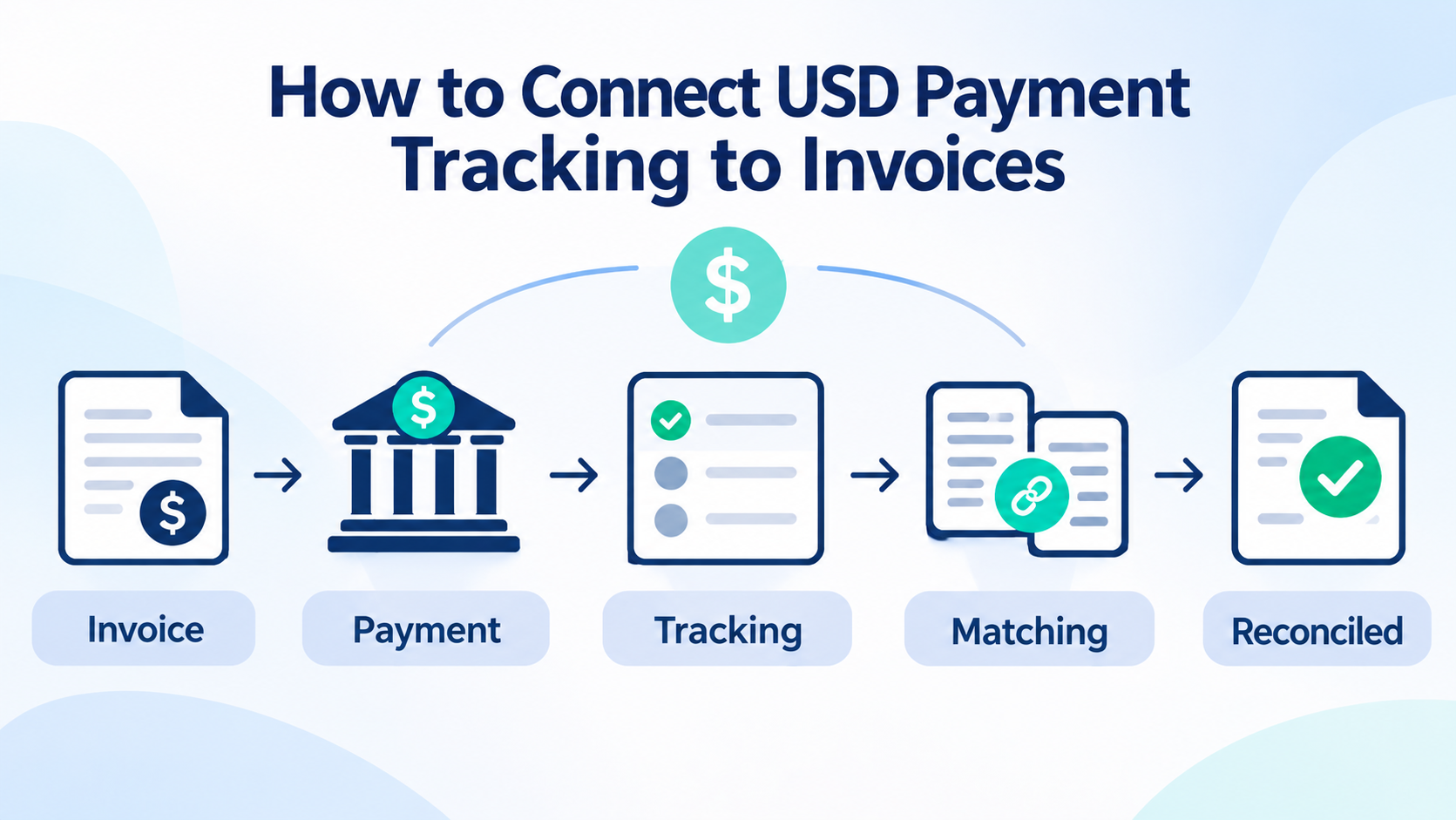
A reliable USD reconciliation process follows a clear sequence: standardize payment references, select the appropriate rail, capture transaction evidence, match payments to invoices, resolve variances, and review the account control total.
A named USD account may help businesses manage collections and payouts without unnecessary currency conversions. The value of the account depends on whether its supported payment routes and transaction information meet the business's reconciliation requirements.
Explore Fuze Business to review named USD account options for eligible businesses without a US entity. Confirm account eligibility, complete KYB, and check supported payment methods before connecting USD payment activity to your invoice reconciliation workflow.